
A Step-by-Step Guide for Local Shops, Service Providers & Growing SMBs
In Kolkata, WhatsApp is not just a messaging app. It is the real operating system of local business.
From mishti shops in Baghbazar to courier services in Sealdah, from Rajarhat pet groomers to Gariahat boutiques — customers expect fast replies, order updates, and easy communication.
This guide shows you how to set up a simple WhatsApp automation system in under 2 hours, without coding, without hiring an agency, and without spending thousands of rupees.
1. Why WhatsApp Is Kolkata’s Real Business Backbone in 2026
- India has over 500+ million WhatsApp users.
- Most customers prefer messaging over calling.
- Email is rarely used by small retail customers.
- During Pujo rush, message overload becomes unmanageable.
If you run:
- A retail shop
- A salon
- A courier service
- A coaching centre
- A pet grooming service
- A home bakery
WhatsApp is already your primary customer touchpoint. As of 2026, over 90% of small businesses in India use WhatsApp as their primary customer communication tool.
The question is not whether you should use it.
The question is:
Are you using it efficiently?
2. What Problems Automation Actually Solves
Without automation:
- You answer “Price?” 40 times a day.
- Customers ask “Are you open today?”
- You forget to follow up on pending orders.
- Appointments overlap.
- Staff give inconsistent responses.
- Pujo season becomes chaotic.
With basic WhatsApp Business setup:
- Greeting messages respond instantly.
- Quick replies save typing time.
- Labels organise customers.
- Catalogue shares products instantly.
- You reduce repetitive work by 30–50%.
Is this guide relevant for you? This guide is ideal if:
- You receive more than 20 WhatsApp messages per day.
- You often reply with the same message repeatedly.
- You struggle during festive rush periods.
- You want structure without hiring extra staff.
This is your Digital Munshi — simple, affordable, and immediately useful.
3. The 2-Hour Setup Guide
Step 1: Install WhatsApp Business
Download:
- iOS: https://apps.apple.com/app/whatsapp-business/id1386412985
- Android: https://play.google.com/store/apps/details?id=com.whatsapp.w4b
Use a separate business number if possible.
Step 2: Set Up Your Business Profile
Go to:
Settings → Business Tools → Business Profile
Fill:
- Business Name
- Category
- Description
- Address
- Business Hours
- Email (optional)
- Website (if available)
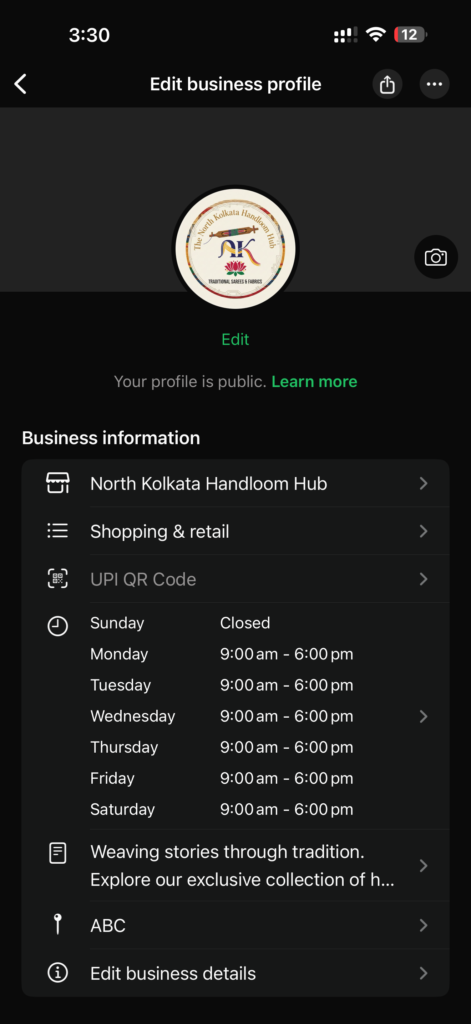
Sample Description Template:
“We are a Kolkata-based [type of business] serving customers in [area]. For orders and enquiries, message us anytime.”
Keep it simple.
Step 3: Set Greeting Message
Go to:
Business Tools → Greeting Message
Turn it ON.
Sample Greeting for Retail Shop:
“Hello 👋 Thank you for contacting [Shop Name]. We will reply shortly. For faster service, please mention your requirement (Product / Size / Delivery).”
Sample for Appointment-Based Business:
“Thank you for reaching out to [Business Name]. To book an appointment, please share your preferred date and time.”

This ensures no customer is left without a response.
Step 4: Create Quick Replies (Major Time Saver)
Go to:
Business Tools → Quick Replies
Create shortcuts like:
/price
“Please tell us the product name or send a picture.”
/location
“We are located near [Landmark]. Here is the Google Maps link:”
/timing
“Our working hours are 10 AM – 8 PM.”
/order
“Please share your order details along with delivery address.”
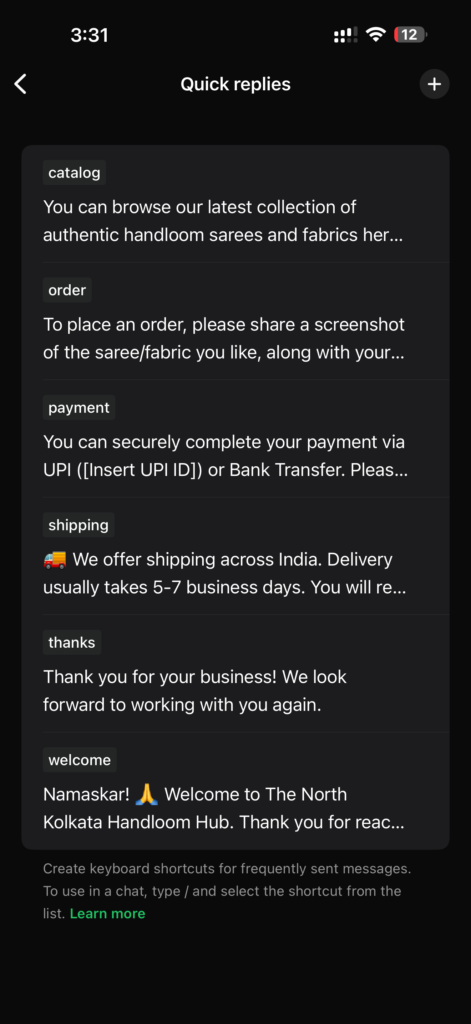
This alone can save 1–2 hours per day.
Step 5: Use Labels as a Mini CRM
This is one of the most powerful features.
Go to:
Business Tools → Labels
Create labels like:
- New Enquiry
- Order Confirmed
- Payment Pending
- Order Dispatched
- VIP Customer
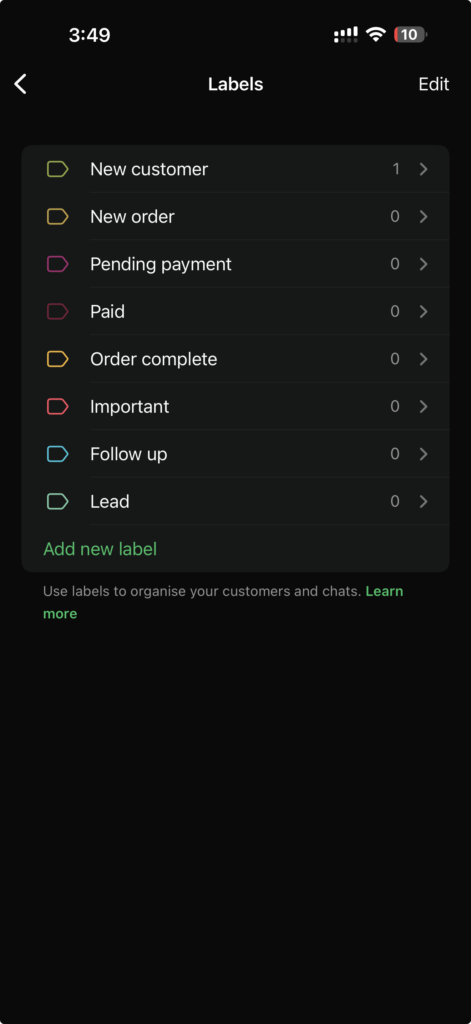
Now you can filter chats instantly.
For a courier in Sealdah or boutique in Gariahat, this prevents chaos during busy seasons.
Step 6: Add Products to Catalogue
Go to:
Business Tools → Catalogue
Add:
- Product Name
- Price
- Description
- Image
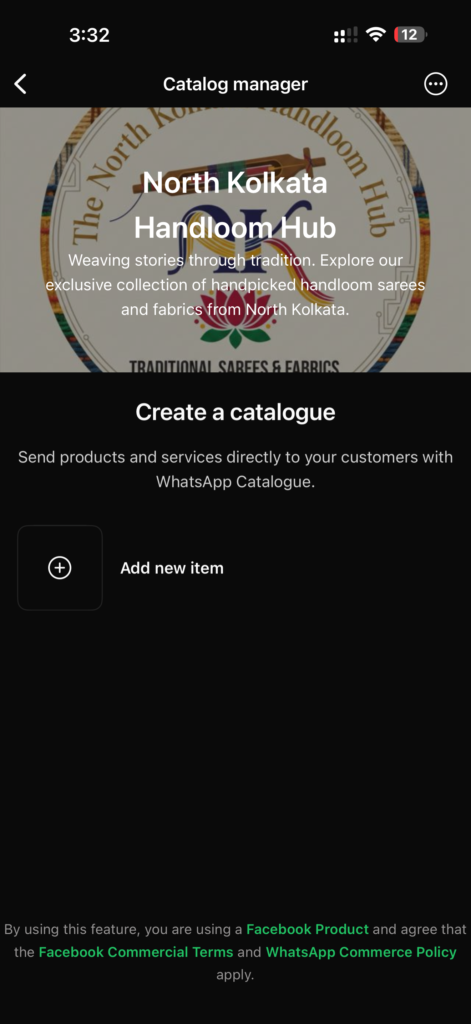
Now instead of typing details, you can send catalogue items directly.
For growing businesses (₹20L+ turnover), this looks professional and reduces back-and-forth.
4. Real Kolkata Use Cases
Gariahat Boutique
- Uses labels for “Trial Pending” and “Alteration Required.”
- Sends catalogue via WhatsApp instead of Instagram DMs.
Sealdah Courier
- Quick reply for “Tracking Status.”
- Labels for “Out for Delivery.”
Rajarhat Pet Groomer
- Greeting message handles 11 PM booking requests.
- Labels for “Next Grooming Due.”
Salt Lake Coaching Centre
- Auto greeting.
- Quick reply for “Fee Structure PDF.”
This works across business sizes.
5. Cost Breakdown (₹)
Basic Setup: FREE
Time Investment: 1–2 hours
Optional Paid Tools (only if scaling):
- Automation platforms: ₹2,000–₹5,000 per month
- CRM integration: ₹3,000+ per month
Most small businesses do NOT need paid tools initially.
Start simple.
6. Mistakes to Avoid
- Over-automating everything
- Sending spam broadcasts
- Ignoring customer tone
- Not responding manually when needed
- Using only English (use Bengali/Hindi mix if required)
Automation should support human touch, not replace it.
7. 7-Day Implementation Plan
Day 1: Install & setup profile
Day 2: Create greeting message
Day 3: Add 5 quick replies
Day 4: Create 5 labels
Day 5: Upload 5 catalogue items
Day 6: Train staff
Day 7: Review & refine responses
Within one week, your business communication becomes structured.
Final Verdict: Your Digital Munshi Has Arrived
You do not need complex AI tools to modernise your dokan.
WhatsApp Business itself is your first Digital Munshi.
Start here.
Then scale gradually.
Kolkata businesses don’t need hype.
They need simple, practical systems that save time and reduce stress.
This is Step 1.
To take your business and customer management to the next step read our Customer Relationship Management Guide for Businesseses in Kolkata.
Frequently Asked Questions
Is WhatsApp Business free for small businesses in India?
Yes, the basic version of WhatsApp Business is free. Most small businesses do not need paid tools initially.
Can I use WhatsApp Business on the same phone as personal WhatsApp?
Yes, you can install WhatsApp Business alongside regular WhatsApp if you use a separate phone number.
Is WhatsApp automation legal in India?
Using official WhatsApp Business tools and APIs is legal. Avoid spam broadcasting to unknown contacts.
Leave a Reply